Ask a Fox - Firefox 150 edition
Firefox 150 is here and we want you to be part of this exciting moment!
We’re inviting everyday Firefox users like you to come together to support fellow users in your own language and be part of this shared effort.
Our mission is simple. Help us reply to every Firefox question in the SUMO Community Forums and make sure that no Firefox user gets left behind.
Over the course of the week, look forward to:
- Join our community virtual hangouts
- Get special badges and swag giveaways
Let’s show up for every Firefox user who needs help and make sure no question goes unanswered!
Get started in the Community Forums
🟡 Beginner level: Your first wins
Are you new to SUMO? Perfect. Let’s get you your first forum replies (and your first badge)!
🎯 Challenge 1: VPN Questions
Firefox recently landed a built-in VPN in the browser and that has created a lot of excitement. However, a lot of the users didn’t notice that this might not be available in their country, creating confusion.
Let’s help these people out by starting here:
- Register as a forum contributor at the Mozilla Support platform. This is an important step to ensure that you’ll get access to community functionalities in the forum.
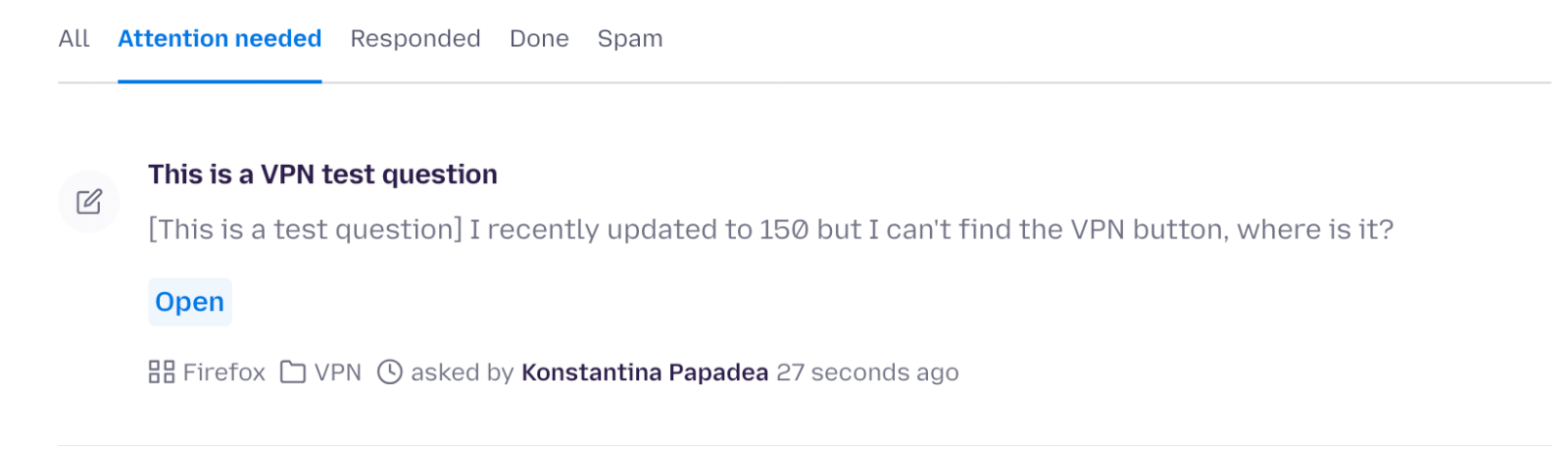
- Open the list of VPN questions
- Pick a question that hasn’t been replied before where a user is asking about VPN availability. Look for things like “where is my VPN, I can’t find the VPN button, I am in Australia but there is no VPN button”.
- Open the question you want to reply in a new tab.
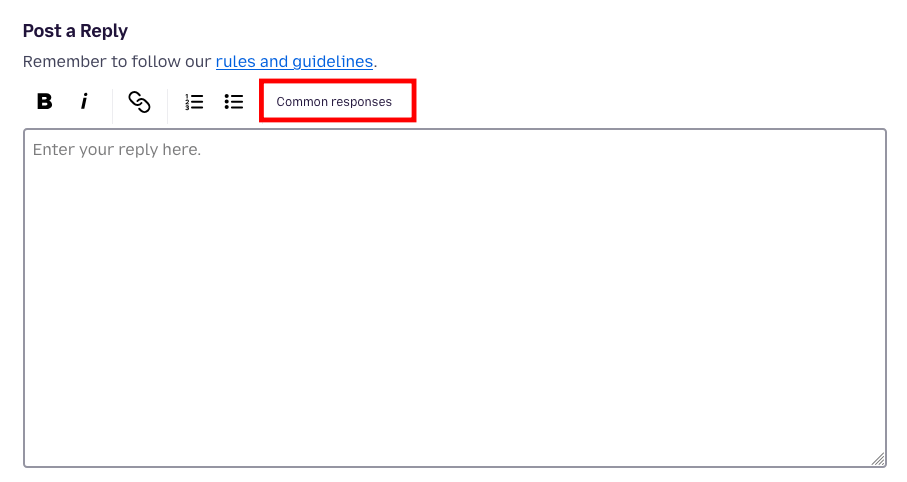
- Click on the “Common Responses” menu.
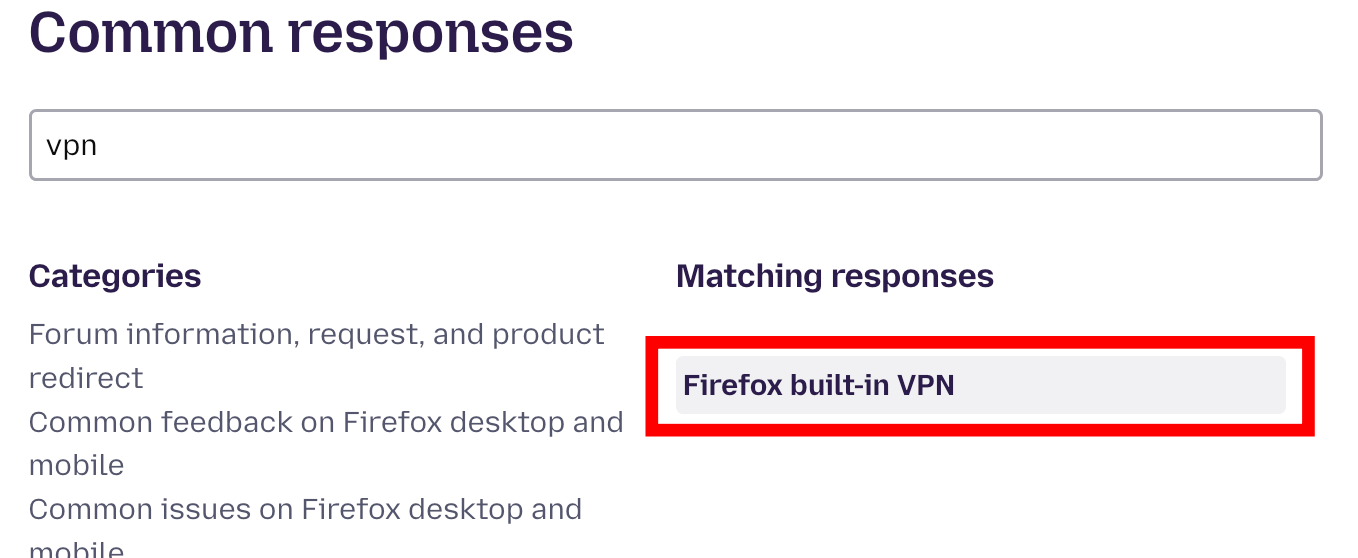
- Type “VPN” and click on the Firefox built-in VPN
- Scroll down and Click Insert Response.
- Adjust or customize the reply and clock on the Post Reply button when you’re ready.
That’s it! You’ve just made your first contribution and you’re on your way to earning your first badge. Keep replying to 5 or more questions to earn the badge!
🟡 Beginner level: Your first wins
🎯 Challenge 2: Lost Bookmarks
Ready for the next step?
Did you know that one of the biggest issues users face is losing their bookmarks after an update?
Let’s help these users recover their bookmarks:
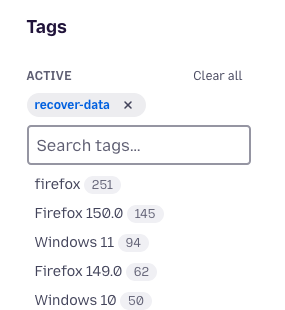
- Go to Firefox Community Forum. On the right sidebar, you will see a list of tags. Type Recovery Data.
- Click on the tag to show questions related to Recovery Data.
- Look for questions where users say they lost their bookmarks and open the question in a new tab.
- Click the Common Responses menu to select a common response.
- Search for “bookmarks”. Select “Recover bookmarks and other profile data missing after update” common response.
- Insert the response and you’re ready to post!
💡 Pro tip:
- Always read the user’s question carefully and make sure you understand their issue before replying.
- Use [[Article Name]] markup to link a KB article.
- Unsure about a question? No problem! Just move on to another one. There are plenty to choose from.
🟠 Intermediate level: Next level problems
Ready to level up? Let’s tackle one of the biggest categories in our forum.
Did you know one of the most common issues we see in Firefox forum is web compatibility?
These are cases where:
- A website doesn’t open in Firefox
- A site stopped working after an update
Find these types of questions using the Webcompatibility tag and help answer the unanswered questions!
How to Approach These Questions
- Pick a question like:
- “This website doesn’t open on Firefox”
- “This site stopped working after the latest update”
- Start with this reply:
Hi there,
Thanks for reporting. Please try disabling Enhanced Tracking Protection (ETP), clearing Firefox cache, or clearing cookies and data for the website you experience troubles with (warning: you will be logged out on this website).
💡 Pro tip: Use the Question Details section on the right sidebar to learn more about the user’s environment such as the OS and Firefox version they’re using.
If that doesn’t help:
Suggest the OP to try running Firefox in Troubleshoot Mode and try creating a new Firefox profile for testing.
Lastly, if none of the previous steps help, check if the issue persists in other browsers.
If the issue persists in other browsers:
- Let the OP know the issue is likely on the website’s side
- Encourage them inform the website owner or administrator about the issue
If the issue only occurs in Firefox, you’ve likely found a real web compatibility issue 🎯
Suggest:
- The user to file a webcompat report
- Or file one yourself on their behalf
💡 Pro tip: When a user replies to you, you will receive an email on your email inbox. Make sure that you check that during the week.
🔴 Expert level: Take it further
Feeling confident? Let’s raise the bar. At this level, you’ll:
- Work across multiple categories
- Handle more complex cases
- Help maintain quality and consistency
🎯 Your challenge
Use combined tags to find the right questions faster.
Examples:
- Recovery Data + Windows 11
- VPN + Firefox 150
- Install + linux
Best Practices
- Use Common Responses to stay consistent
- Personalize your replies to make them feel human and helpful
- Adapt responses based on the user’s situation
- Focus on clarity and empathy
- To find all questions you’ve participated in, check out the Show me section on the forum list of questions, and click on the My Contributions menu.
💡 Pro tip: The more thoughtful your replies, the more impact you make. You’re not just answering questions, but also improving someone’s experience.
Community Virtual Hangouts schedule
Community Virtual Hangouts #1
- Wednesday, April 29, 2026 at 10:00 UTC (Time converter) (Add to Google Calendar)
- Come say hi and learn how to find the right questions for you. Bring your curiousity and positive energy for a casual virtual hangout with the Community team!
- Link to join: Zoom link (password: fox)
- Livestream links: YouTube and Air Mozilla
Community Virtual Hangouts #2
- Thursday, April 30 2026 at 16:00 UTC (Time converter) (Add to Google Calendar)
- Join us to celebrate what we’ve accomplished so far, share your experiences, and reflect on what we can improve together.
- Link to join: Zoom link (password: fox)
- Livestream links: YouTube and Air Mozilla
Perks
Free Zoom backgrounds
- You can download our special Zoom backgrounds for free!
Badges
- Fox on a mission: Reply to at least 5 questions during the event to earn this badge.
- Fox on fire: Go for the extra mile and reply to 15 or more threads to unlock this special recognition.
- Fox streak master: Show up everyday and reply to forum questions throughout the event to earn this extra special badge.
Swag vouchers
- A total of 10 swag vouchers to shop at Mozilla merch will be awarded to the top 5 most active participants and 5 top newcomers!
Frequently Asked Questions
Frequently Asked Questions
Q: What is Ask a Fox?
A: Ask a Fox is a week-long community event (April 21–27, 2026) where Mozilla supporters — community members, newcomers, and staff — come together to help Firefox users in the Community Forums, connect with each other, and celebrate our shared mission.
Q: Who can participate?
A: Anyone! Whether you’re a long-time community member, brand new, or a Mozilla staff member, you’re welcome to join. The true power of our community shines when we come together!
Q: How do you define newcomers?
A: Forum newcomers are community members who have replied to a question (other than their own, with their first reply occurring within the past year.
Q: How can I join in the community call or the virtual get together?
A: You can either join us on Zoom or watch the call from YouTube or Air Mozilla. The links are provided in the Google Calendar schedule linked in the schedule section above.
Q: How can I ask questions during the call?
A: If you join us on Zoom, you can virtually raise your hand with Zoom functionality. Otherwise, you can ask questions using the SUMO room on Matrix or submit your questions in advance by posting on this thread.
Q: How much are the vouchers worth?
A: Each voucher is worth either $50 USD or €50 EUR depending on which swag store you choose (North America or Europe).
Q: Do you cover the duty cost associated with the swag?
A: Yes! We can reimburse the duty cost. Just make sure to keep and send us your receipt.
Q: I have more questions!
A: If you have any questions about this event, please reach out to Kiki.